























Choose your days & data
15 Region collections · 237 Plan variants

Language · 0
Currency
From HK$78
From HK$58
From HK$78
From HK$20
From HK$138
From HK$25
From HK$25
From HK$18
From HK$58
From HK$38
From HK$58
From HK$108
From HK$68
From HK$68
From HK$98
15 Region collections · 237 Plan variants Choose a format supported by your phone. Confirm the selected plan’s format and availability with the shop.
Japan dual/triple networks and Australia Telstra/dual networks are listed separately.
| Compare | B4travelJapan Dual | B4travel PlusJapan Plus | B4travelAustralia Telstra | B4travel PlusAustralia Plus |
|---|---|---|---|---|
| Networks | Softbank KDDI | Docomo Softbank KDDI | Telstra | Vodafone Optus |
| Lowest-price variant | HK$78 5 Days · 5GB | HK$98 5 Days · 5GB | HK$25 1 Days · 1GB | HK$20 1 Days · 1GB |
| Available durations | 5-365 Days | 5-30 Days | 1-365 Days | 1-30 Days |
| Plan variants | 22 | 14 | 16 | 16 |
Lowest-price variants differ in duration and data; this is not a like-for-like price or network performance comparison.
Regional collection
Check each regional plan’s coverage before you travel.
B4travel · Travel SIM cards and eSIM
Take connection with you. Choose a plan for your destination, days and data needs.








15 Region collections · 237 Plan variants
Japan dual/triple networks and Australia Telstra/dual networks are listed separately.
Choose a format supported by your phone. Confirm the selected plan’s format and availability with the shop.
Find Hong Kong store addresses and contact details. Call before visiting to confirm opening hours, stock and installation help.
Usually about a minute after payment, the QR code is emailed to your checkout address and can also be viewed on your account/orders page. This is an estimate; actual timing depends on order processing and delivery.
Confirm current prices, stock, SIM format and purchase terms at b4travel.shop or with a store.
Dial *#06#: if you see an EID, it is supported; locked phones must be unlocked first.
點擊圖片開啟原尺寸,可放大閱讀
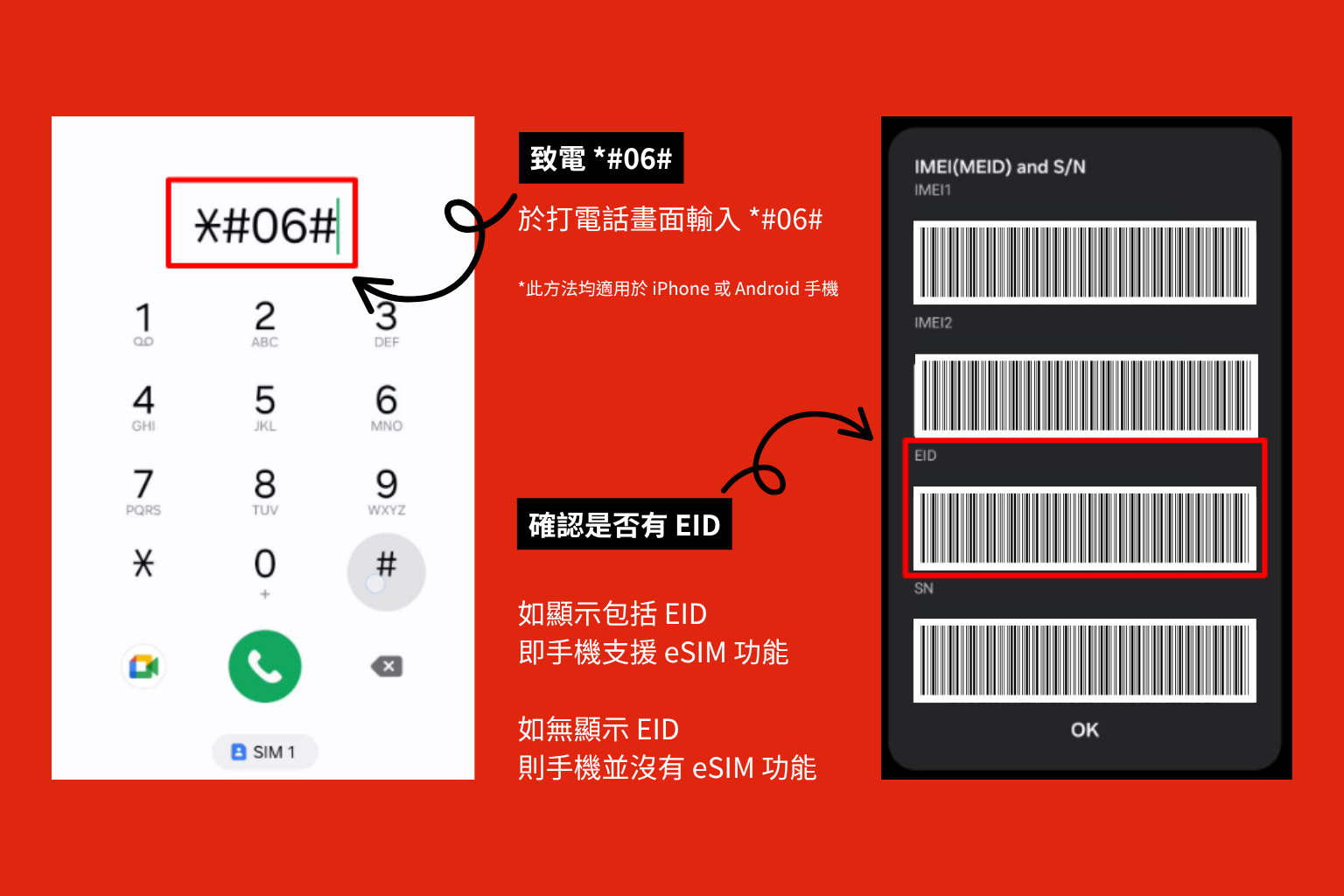
After the high-speed quota, unlimited use continues at 384kbps; 365-day annual cards stop when used up
My eSIM · Integration pending
Yes. Add or install the eSIM over Wi-Fi before departure without starting the validity days. Activation and the day count begin when you arrive and connect to a supported network at the destination. Installing the profile or merely switching the line on is not destination activation.
Install using the supplied QR code or details over Wi-Fi. On arrival, select the data line and configure roaming and APN as instructed by your plan.
點擊圖片開啟原尺寸,可放大閱讀
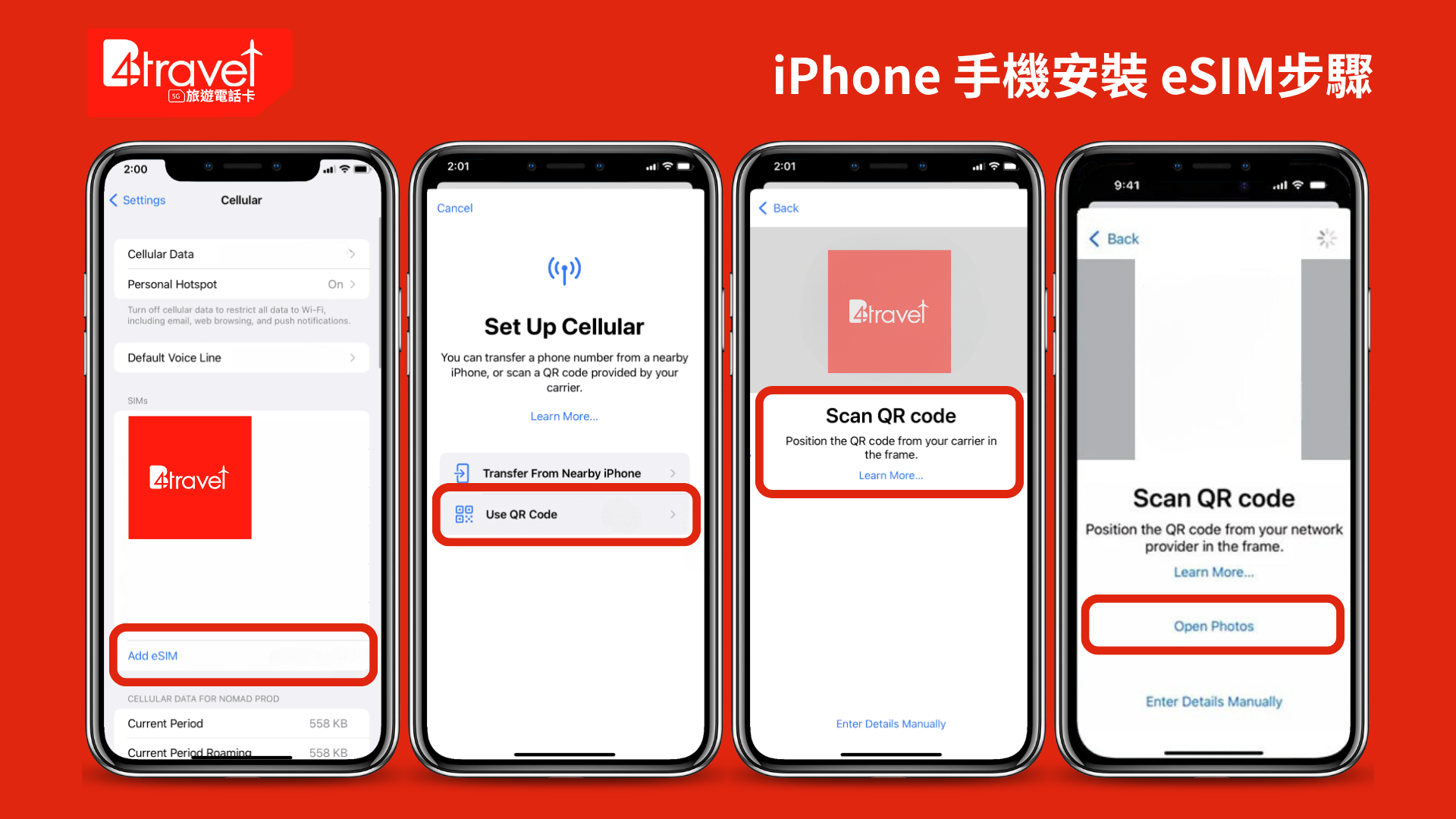
Install using the supplied QR code or details over Wi-Fi. On arrival, select the data line and configure roaming and APN as instructed by your plan.
點擊圖片開啟原尺寸,可放大閱讀
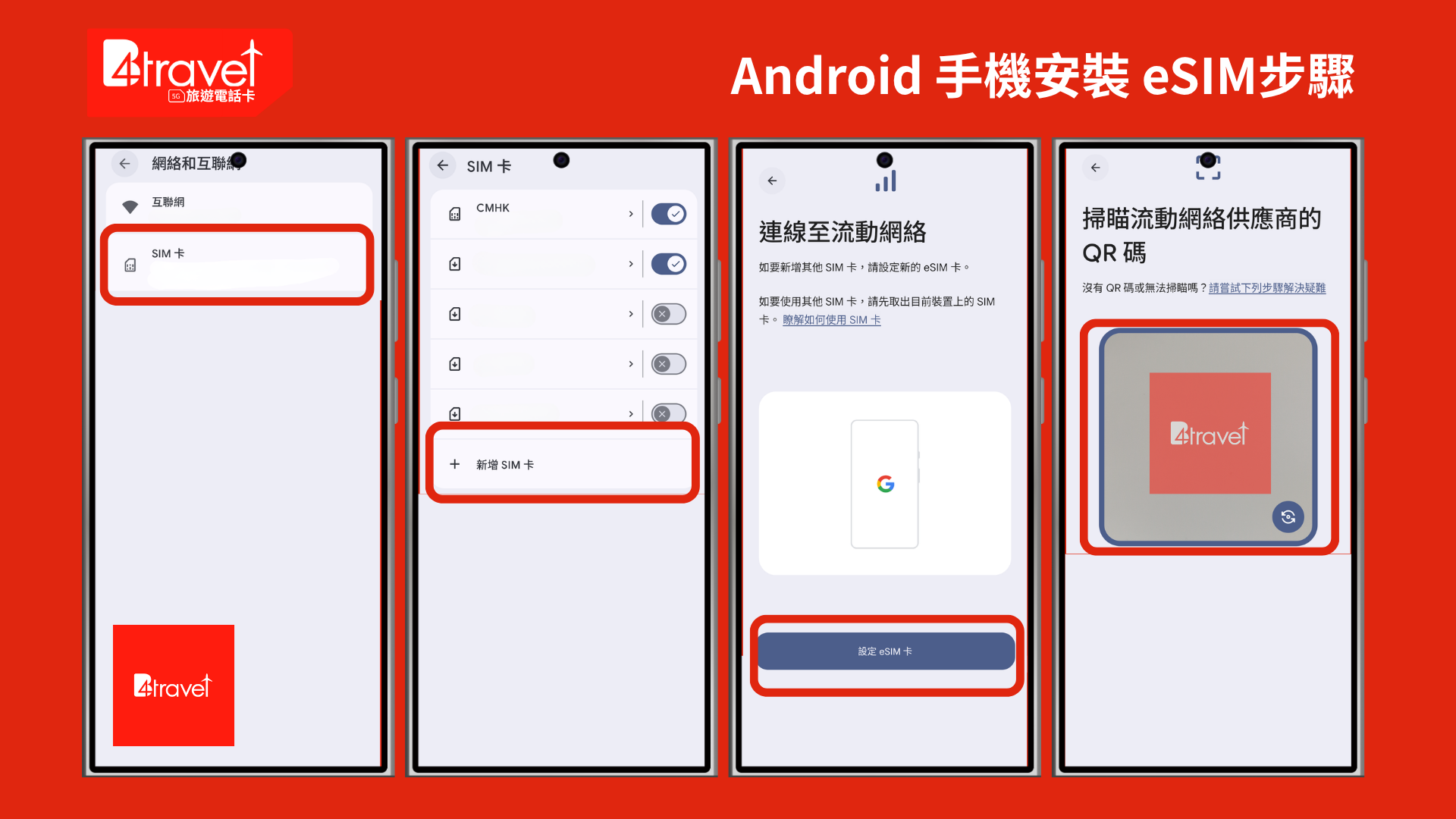
Check your device & plan
Yes. Add or install the eSIM over Wi-Fi before departure without starting the validity days. Activation and the day count begin when you arrive and connect to a supported network at the destination. Installing the profile or merely switching the line on is not destination activation.
Confirm eSIM support and an unlocked phone with the manufacturer. Ask the shop about physical SIM options if needed.
Install using the supplied QR code or details over Wi-Fi. On arrival, select the data line and configure roaming and APN as instructed by your plan.
Yes. Add or install the eSIM over Wi-Fi before departure without starting the validity days. Activation and the day count begin when you arrive and connect to a supported network at the destination. Installing the profile or merely switching the line on is not destination activation.
